The Truth About the 8Bitdo Ultimate 2: Pros, Cons, and Verdict
In the crowded market of third‑party gamepads, the 8BitDo Ultimate 2 arrives positioned as a premium, highly configurable controller that promises console‑style comfort with PC and mobile versatility. This article examines what the Ultimate 2 delivers in practice: the hardware quality, software customization, day‑to‑day performance, and whether it represents good value for different types of buyers. The goal is to provide a measured, practical assessment rooted in real‑world use cases—from competitive multiplayer to retro emulation and long couch sessions—so readers can decide if it fits their needs.
Introduction
8BitDo built its reputation on making controllers that balance nostalgia and modern features: modular firmware, wide cross‑platform compatibility, and value. The Ultimate 2 is the company’s answer to players who want advanced features (remappable buttons, extra paddles, adjustable sticks, etc.) without buying multiple controllers for different systems. On paper, it looks like a one‑stop solution. In reality, how it performs depends heavily on what a buyer prioritizes—latency, ergonomics, build durability, or the depth of customization.
Detailed Product Review and Analysis
Design and Ergonomics
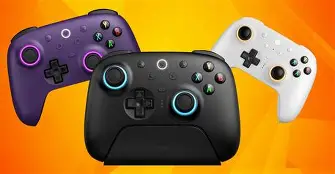
The Ultimate 2 follows a design language familiar to modern dual‑stick controllers: rounded grips, offset analog sticks, a pronounced D‑pad, and textured surfaces on the handles. For players with average to larger hands, the controller is comfortable for extended sessions; smaller‑handed players should test it in person when possible. Button spacing and reach are intuitive, and the weight tends toward the middle of the range—solid but not heavy, which helps for long play sessions without feeling flimsy.
Back buttons (or paddles) are included on the premium configuration and are positioned to be used without releasing the thumbs from the sticks. This is a real advantage for fighting‑game inputs and FPS quick‑actions, where binding frequently used commands to paddles reduces finger travel and improves reaction times.
Build Quality and Materials
Materials are generally above average for an aftermarket controller: a matte plastic shell, rubberized grips, and tight seams. The thumbsticks feel precise, and the face buttons offer a responsive, clicky feedback. Critically, how the sticks and triggers age is a common concern for buyers. While the Ultimate 2 uses quality components, users should remain aware that stick drift is a potential failure mode for any analog stick over long‑term heavy use; 8BitDo’s approach to replaceable thumb modules or serviceable parts (where available) helps mitigate that risk compared with sealed, single‑use controllers.
Connectivity and Compatibility
One of the Ultimate 2’s strong suits is broad compatibility. It connects via Bluetooth, wired USB‑C, and—when applicable—via a 2.4GHz wireless adapter. This flexibility means it works with Windows, macOS, Android, Steam Deck, Nintendo Switch, and in many cases with consoles via adapters or native modes. For people who switch between portable and docked gaming, or who use the same controller on PC and mobile, this multi‑mode support is convenient and reduces the need to buy multiple devices.
Real‑world caveat: platform quirks still exist. Certain console features (for example, console‑specific menu shortcuts or haptic implementations) can vary by platform and may require mode switching. Players should verify the compatibility list for their intended devices, and be prepared to change modes or update firmware to get the best behavior on a given system.
Software and Customization
8BitDo’s customization software is central to the Ultimate 2 experience. The app enables remapping every button, creating macros, swapping analog curves, adjusting trigger sensitivity, and storing multiple profiles that can be switched on the fly. For competitive players and streamers who need different setups for different titles, profile switching is a practical time‑saver.
Looking for the best Electronics deals on Amazon?
Browse Now →Macros and advanced remapping are powerful but require some time to learn. The software is reasonably intuitive, but buyers who want a controller that “just works” out of the box should be ready to spend an hour configuring custom setups if they want to take full advantage.
Performance and Latency
Input latency is a priority for competitive play. When connected via wired USB‑C, latency is negligible and suitable for fast FPS and fighting games. Wireless modes introduce slightly more latency, but in day‑to‑day gaming this is rarely perceptible for casual or single‑player use. For tournament or pro‑level competitive environments, wired mode is recommended.
Wireless connection stability is generally strong, with good range for living room setups. A small number of users report intermittent disconnects in very RF‑noisy environments; using the dedicated 2.4GHz adapter (if included or available) can improve stability compared to Bluetooth in such conditions.
Battery Life and Charging
Battery life is solid enough for extended play, and the controller charges over USB‑C. Users who play multiple long sessions in a single day or who prefer always‑on controller readiness may prefer a wired connection or keep a charging cable handy. The absence of an easily swappable battery pack is a minor negative for those who game on the go and can’t stop to recharge.
Advanced Features
Depending on the firmware and variant, the Ultimate 2 can include features such as gyro/motion controls, adjustable stick deadzones, and haptic feedback. Gyro aiming is particularly useful in open‑world and aiming‑assist scenarios, and adjustable curves can make the difference for precision shooters. The presence of back paddles and multiple profile slots makes the Ultimate 2 a viable choice for players who want console‑grade control plus PC‑style customization.
Durability and Long‑Term Considerations
Like all controllers, long‑term reliability depends on use patterns. Intense competitive players may wear through triggers and sticks faster than casual users. 8BitDo’s firmware updates and active software support are strong positives; ongoing software updates can improve compatibility and introduce new features. Buyers who prioritize longevity should check 8BitDo’s support policy and local repair/replacement options.
Pros & Cons
- Pros
- Wide cross‑platform compatibility (Bluetooth, USB‑C, and 2.4GHz options)
- Extensive customization via companion software: remapping, macros, profiles
- Comfortable ergonomic design for long sessions
- Back paddles and programmable buttons appeal to competitive and accessibility use cases
- Good build quality and solid tactile feedback
- Wired mode offers low latency suitable for competitive play
- Cons
- Premium price compared with basic third‑party controllers
- Advanced features require time to learn and configure
- Wireless latency can be higher than native first‑party controllers in some modes
- No quick‑swap battery system; rechargeable battery limits continuous all‑day use without recharge
- Potential for analog stick wear over long, intense use (common to most controllers)
How the 8BitDo Ultimate 2 Compares
A comparison helps place the Ultimate 2 against mainstream alternatives. The table below summarizes typical tradeoffs; readers should weigh which attributes matter most for their use case.
| Controller | Best for | Platforms | Customization | Notable tradeoff |
|---|---|---|---|---|
| 8BitDo Ultimate 2 | Users who want one flexible controller across PC, Switch, and mobile with deep remapping | Switch, Windows, macOS, Android, Steam Deck (via Bluetooth/USB/adapter) | Extensive (remapping, macros, profiles, stick/trigger curves) | Requires learning curve for advanced features; premium price |
| Nintendo Switch Pro Controller | Switch players who want native compatibility and first‑party ergonomics | Switch (best), limited PC support | Basic (limited remapping via console) | Less configurable on PC/mobile compared with aftermarket options |
| Xbox Wireless Controller | Xbox and PC users wanting native Windows integration and reliability | Xbox, Windows, Android (via Bluetooth/USB) | Moderate (app remapping available) | Fewer macro/profile options than specialized controllers |
| Sony DualSense | PS5 players who value adaptive triggers and haptic immersion | PS5, PC (partial feature support) | Limited for macros; strong for platform‑specific haptics | Best experience tied to PS5; limited cross‑platform feature parity |
Real‑World Use Cases
Casual and Single‑Player Gamers
For players who primarily play single‑player titles and want a comfortable controller that also works on PC and mobile, the Ultimate 2 is a sensible choice. The customization options are useful but not mandatory—out of the box it functions well in most games and offers a comfortable grip for long RPG or adventure sessions.
Looking for the best Electronics deals on Amazon?
Shop Amazon →Competitive and Fighting Game Players
Competitive gamers will appreciate the paddles, macros, and wired mode for minimal latency. However, players who participate in official tournaments should confirm tournament rules around third‑party controllers and macros. The custom profiles and fast access to back buttons can be a significant advantage in fighting games and FPS titles where input speed matters.
Retro Emulation and Input Mapping
Retro enthusiasts and emulator users often value remappable inputs and multiple profile slots. The Ultimate 2’s flexibility to change button layouts, map macros, and tweak deadzones makes it ideal for mapping older controllers and arcade inputs to modern controllers without relying on extra middleware.
Streamers and Content Creators
Streamers benefit from the device’s programmability: binding scene switches or stream macros to controller buttons is possible via the remapping software and OS‑level shortcuts. The controller also looks modern on camera and works across devices creators use (console, PC, mobile) without swapping hardware.
Buying Guide: What to Consider Before Purchasing
- Platform compatibility: Confirm that the controller supports your primary platform and any secondary devices you plan to use. Check whether a 2.4GHz adapter is required for best performance on specific platforms.
- Wired vs wireless priority: If competitive play is a priority, verify low‑latency wired performance. For couch play, ensure wireless stability and range meet the living‑room layout.
- Customization needs: Decide how much time we will invest in customization. If deep remapping and macros are essential, a controller with a robust companion app is necessary.
- Ergonomics and hand size: Test the controller physically if possible. Grip comfort and button reach differ among designs; try before buying if hand size is a concern.
- Battery expectations: Look for battery life information and charging options. If one can’t easily pause to charge, a wired fallback or spare charging cable is useful.
- Durability and serviceability: Research the availability of replacement parts and the manufacturer’s firmware support; these extend a controller’s lifespan.
- Price versus value: Compare what features are truly needed. The Ultimate 2 is feature‑rich, but some buyers may be better served by a first‑party controller or a cheaper third‑party model if advanced customization is not required.
- Warranty and support: Check the warranty duration and how the manufacturer handles repairs or defects in the buyer’s region.
Verdict and Conclusion
The 8BitDo Ultimate 2 is aimed at players who want a single, flexible controller that spans platforms and offers deep customization. It shines when adaptability matters: remapping and macros, multiple profiles, back paddles, and broad connectivity make it a compelling option for power users, streamers, emulation fans, and many competitive players who prefer wired play for tournaments.
For casual players who prioritize out‑of‑box simplicity and platform‑specific features (such as first‑party haptics or native console menus), a first‑party controller may still be the better fit. The Ultimate 2 asks the buyer to trade some convenience for versatility and configurability. It also commands a premium over basic controllers, so the buyer should value those advanced features to justify the cost.
In short, the Ultimate 2 is a strong pick for anyone who wants one controller to rule multiple platforms and who values the ability to tailor inputs precisely. It offers a worthwhile balance of build quality, comfort, and software customization. Buyers focused solely on single‑platform convenience, minimal setup, or the absolute lowest latency in wireless competitive play may prefer alternatives. For most enthusiasts and power users, the Ultimate 2 delivers real utility and an excellent feature set that can replace a small shelf of separate controllers.